Write the AI Disclosure While You Make the Work
 Creative Studio Editorial
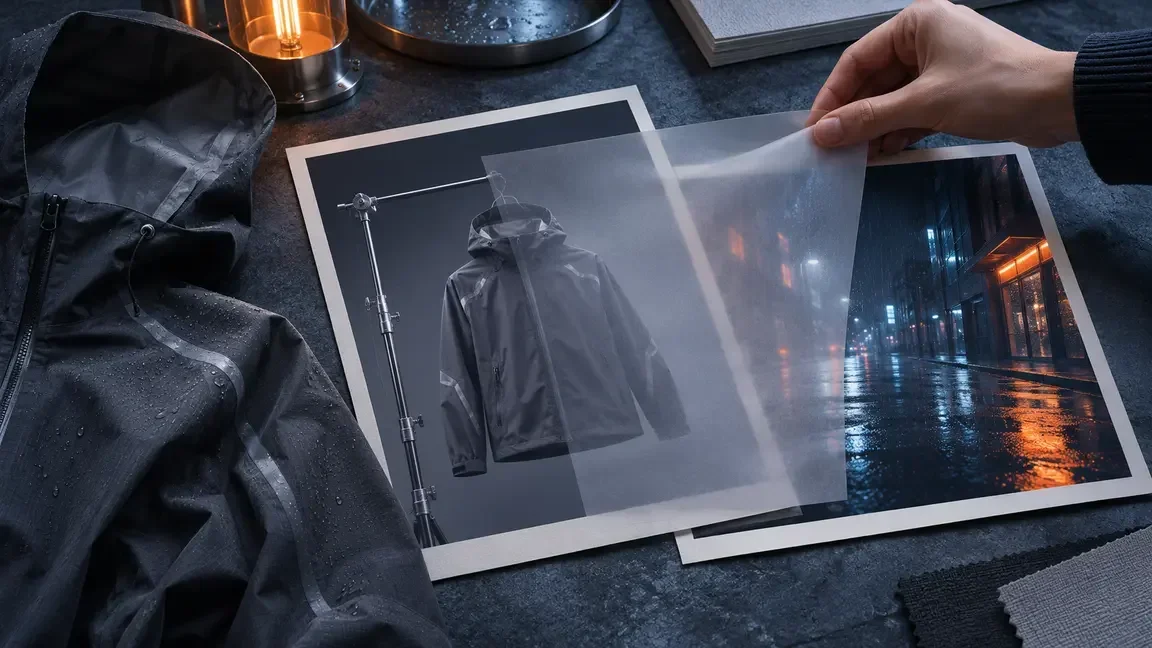
A crew photographs a rain jacket in a studio, then places it into an imagined night street for the opening shot of a campaign. The garment, its stitching, and the way it folds came from the camera. The street was generated. A producer who remembers how that shot was made can explain it in one line. Someone receiving only the finished export may assume the crew filmed outdoors.
Record changes at the level someone can check
As shots enter the edit, record which parts came from a camera, which were generated, and what was materially changed. Tie the entry to a shot or a time range so an editor can find it. A short note for the jacket film could say “Opening, 00:00–00:04. Photographed jacket composited over a generated street. Studio lighting and garment appearance retained.” Include the source or version in the internal record if it helps someone reconstruct the choice.
Keep temporary experiments separate from the finished picture. If a generated street was used for the pitch and replaced with a recorded location, update the shot entry when the new material goes in. The disclosure should describe what people can see or hear in the delivered version. A remaining background element may still matter even after the original concept image has gone.
Start with what the audience might infer
Review the sequence once from the viewer’s perspective. For the jacket film, the location can look real while the product remains accurately photographed. A clear description such as “The rain jacket was photographed in studio. The nighttime street in the opening was generated” helps the viewer understand both parts. Place the note near the film or alongside the image where it gives the most context.
Think about the inference that changes when a shot changes. A composite may suggest somebody visited a particular place. Replacing dialogue may suggest a person spoke a line in that setting. A simple staging note can be enough for an imagined scene if it makes the origin of the scene clear. Specify the affected element where a broad label would leave an avoidable ambiguity.
Review the wording alongside the latest cut
Give the disclosure an owner and put it on the same approval list as the captions and credits. Have one person compare the disclosure against the export, especially if a shot was replaced late. If the jacket team swaps the generated street for footage shot outdoors, the reviewer should see that in the updated shot record and revise the note before the export goes out.
Keep a short public description and a more detailed handoff. The latter can identify the clip, the approved version, and the person who confirmed the wording. A team adapting the film for a product page or a shorter cut can then carry the relevant line forward. With the information attached to the asset, the next team can avoid copying a disclosure that belongs to a shot they removed.
Make the note useful on its own
Read the note without the project chat open. It should identify the real or generated material clearly enough for someone who did not attend the shoot. If the wording describes the tool more clearly than it describes the shot, rewrite it around what was made and where it appears. That small review also makes the production record easier to use the next time the work is edited, licensed, or republished.