Veo 3.1 and the Sound of a Single Shot
 Creative Studio Editorial
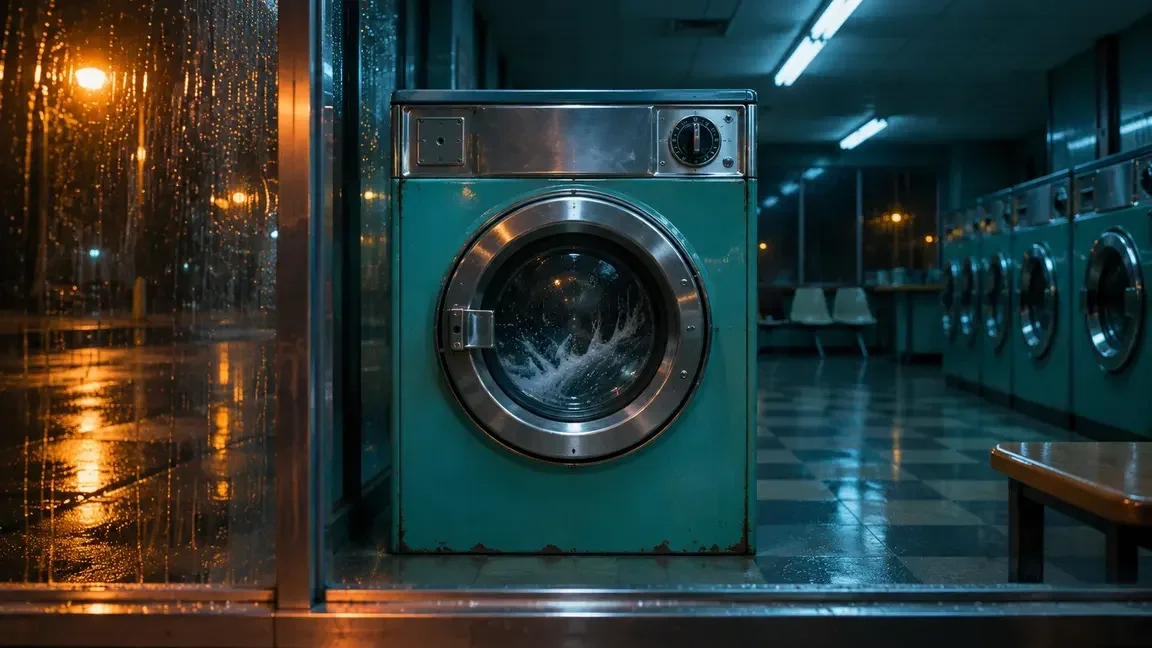
A short video can carry a scene change with one sound. Picture a laundromat at night. Rain is audible before the washer’s drum slows. A light mechanical clunk marks the moment it settles. That cue gives the editor a place to cut and the viewer something concrete to notice.
Google Veo 3.1 supports audio with generated video. That makes it possible to explore timing and texture in one pass. Treat the result as a take with a picture and a sound track. Each needs its own review.
Specify the sound your scene needs
Write an audio brief with a continuous bed, a single featured cue, and a short tail. Here the bed is rain on glass. The cue is a small mechanical clunk. A little rain after the cue gives the editor room to carry the sound across a cut. An extra door slam or a music sting would compete with the washer.
On the picture side, keep the camera locked. Reflections, drum movement, and the rain already supply motion. A fixed viewpoint also makes it easier to judge whether the featured sound follows the visible event. Use an action that has a readable beginning and ending, then describe how it should sound at that endpoint.
Prompt for a quiet mechanical cue
Locked-off landscape shot inside a small unbranded laundromat at midnight. One chrome front-loading washer dominates the frame. Amber streetlight reflects in the rain-wet front window behind it, with deep teal shadows inside. The drum slows gradually, settles, and makes one quiet mechanical clunk exactly as it stops. Soft rain patter throughout, with a beat of rain after the clunk. No music, voices, on-screen lettering, or camera motion.
Record the model variant and output settings beside the prompt. If you need a second take, change one audio instruction at a time. For example, specify a dry, close click in place of a clunk if the first cue is indistinct. Keep the shot geometry and action fixed while evaluating how the new wording changes the mix.
Review at ordinary listening levels
First play the clip on a laptop or phone speaker. Can you hear the cue without turning the volume up? Then watch the drum at the moment of the sound. If the clunk lands ahead of the stop, a frame-accurate edit or a replacement sound may be cleaner than another whole video render.
Play it again muted. The drum should still read as slowing and settling. If it only feels complete with audio on, hold a little more picture at the end or choose a clearer moment from another take. Use headphones for a final pass to check for stray speech, tonal noise, or a change in ambience that will draw attention to a cut.
When the clip goes into a larger edit, place its sound on a track you can trim independently. That leaves room to preserve the mechanical cue while replacing the rain with a bed that matches the shot before it. The viewer may never notice that choice, which is usually a good sign.