Choose the Plane of Focus Before You Animate a Still
 Creative Studio Editorial
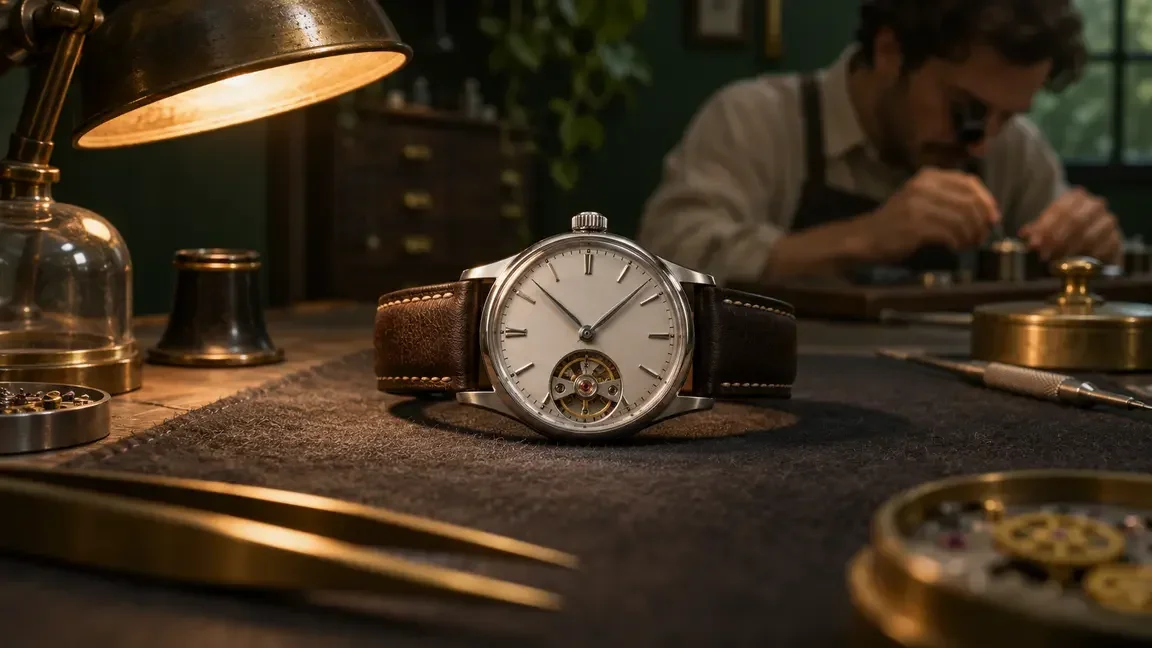
A watchmaker sets a repaired watch on the bench. In the reference still, the dial is sharp, the tweezers in front of it are soft, and the maker’s face sits farther back in shadow. That arrangement already gives the shot a point of view. Animate it without deciding where focus belongs, and the camera move, the hand, and the changing blur can each pull the viewer toward a different subject.
Name the detail that carries the shot
Write down the detail a viewer needs to see and when it matters. If the purpose is to show that the watch is running, the sweep of the seconds hand needs to read. If the purpose is to show the maker’s reaction, the watch can introduce the scene and the face can take over. Those two intentions call for different starting images, even with the same framing.
The plane of focus is where the scene looks sharpest. Depth of field describes the usable range of sharpness around it. You can borrow those concepts even when your shot starts from an illustration or a generated photograph. Pick a distance for the main subject and choose how much useful detail you want nearby. Nikon’s guide to aperture and depth of field explains the relationship for physical cameras.
Check what the reference actually shows
Look at the still at the size you plan to deliver. Find the watch indices, the edge of the case, and any small marks the viewer needs to recognize. If the dial is already indistinct, choose a clearer reference for the close shot. A request to sharpen an illegible detail gives the system room to invent a new one. That can spoil continuity if the same watch appears clearly elsewhere in the sequence.
Check what sits at roughly the same distance as the subject. A bright set of pliers beside the dial may be just as sharp, even though it has no part in the story. Move it deeper into the scene or change the framing so the watch has room to lead. If two people in the same frame both need to read, place their eyes at similar depths or start from a reference that holds both faces clearly.
Give the movement a separate job
Plan either a held focus or a deliberate change. For a held shot, a useful direction is “Keep the dial and seconds hand sharp as the hand moves away. Hold the camera position. The tools in front and face behind stay soft.” Make the movement small enough that you can judge whether the intended details remain consistent.
For a focus change, name both the starting detail and the destination. Start on the dial and shift toward the maker’s eyes after the hand exits frame. Check that the reference includes enough information about the face to support the reveal. A clean close-up may serve the edit better if the face is barely recognizable in the original still.
Review the transition at playback speed
Watch the clip once at normal speed before pausing. Mark the moment your eye switches subjects, then inspect the frames around it. Look for a dial that changes shape, momentary sharpness on the wrong tool, or a blurred face that suddenly resolves into a different person. If the transition keeps competing with the motion, simplify one of them. The finished shot should make the intended detail easy to find at the moment the story needs it.